Skip to content

Birdsuite Bill

Read e-invoices — right in your browser

Read e-invoices: open XRechnung and ZUGFeRD in your browser, check the totals and print — no upload, no software subscription.

  • No upload
  • XRechnung & ZUGFeRD
  • Free

Alternative to ELSTER viewer, sevdesk viewer
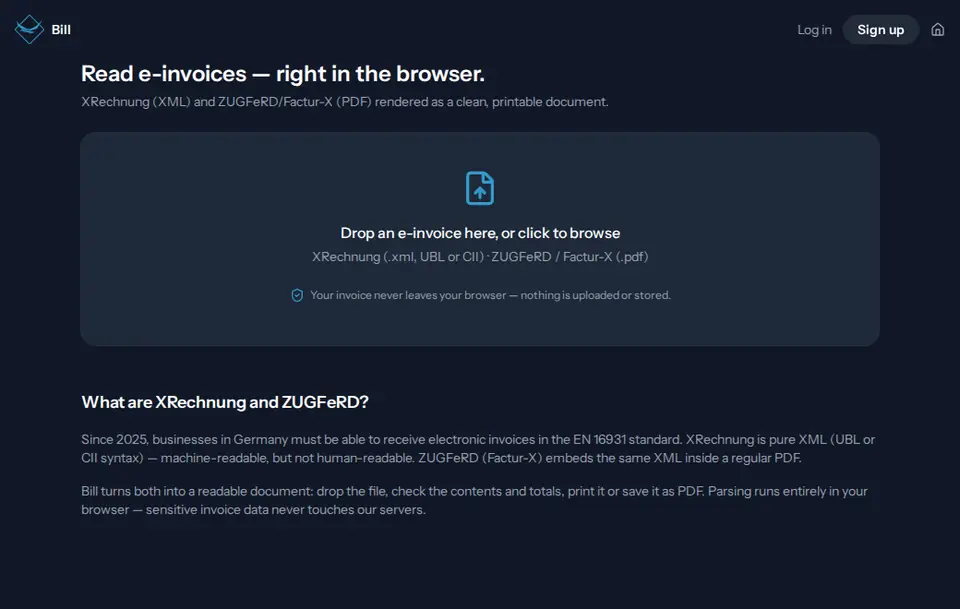
Start page of Birdsuite Bill in the browser

Free

Free: what Birdsuite Bill does without a subscription

Open as many XRechnung and ZUGFeRD invoices as you like

Included for free

  • XRechnung (UBL and CII), ZUGFeRD and Factur-X
  • Totals check
  • Print view and save as PDF
  • No ads, no upload

Free, with no catch

  • No account Open the tool and start. No sign-up, no email address, no password.
  • No ads No banners, no pop-ups, no sponsored results — in the free plan too.
  • No tracking No tracking cookies, no profiles. We only count visits, cookieless and with shortened IP addresses.
  • Stays on your device Your files are processed in your browser and never uploaded.
  • No payment details No credit card and no trial: the free plan stays free for as long as you use it.

There is no paid plan: everything Birdsuite Bill does is free, with no trial that runs out.

Open Bill for free

Birdsuite Bill is a free e-invoice viewer by Berlin Bird Studios: it shows XRechnung (UBL and CII) and ZUGFeRD/Factur-X invoices in your browser as a readable, printable document and checks whether the totals add up. The file is never uploaded and you need no account. The original XML remains the invoice you have to archive.

The problem

Since 2025, German invoices arrive as XRechnung: an XML file that people can hardly read. Many free viewers upload the invoice to their server for that, or are the entry point to an accounting subscription.

The solution

Birdsuite Bill turns the XML file or the ZUGFeRD PDF into a clear invoice with line items, taxes and payment details. Processing runs entirely in your browser, and a totals check shows at once whether the amounts add up.

How it works

  1. 1

    Drop the file

    Drop the XRechnung (.xml) or the ZUGFeRD/Factur-X PDF onto the page, or pick the file.

  2. 2

    Read the invoice

    Bill shows seller, buyer, line items, taxes and payment details as a readable document and checks the totals.

  3. 3

    Print or save

    Print the view or save it as PDF from the print dialog — as a reading aid next to the original file.

Features

XRechnung in UBL and CII

Bill reads both XRechnung syntaxes under EN 16931, including credit notes and corrected invoices.

ZUGFeRD and Factur-X

From a ZUGFeRD or Factur-X PDF, Bill extracts the embedded XML invoice and displays it — the part that counts legally.

Totals check

Bill does the maths: line items against the net total, tax rows against the tax amount, net plus tax against gross, with one cent of rounding tolerance.

No upload

The invoice is read in your browser and never sent to our server. Bill even works without an internet connection once the page has loaded.

Codes in plain words

Invoice type, units and payment method appear readable, such as "Credit note", "h" or "SEPA credit transfer" instead of 381, HUR or 58.

All key details

Seller and buyer with VAT ID, buyer reference (Leitweg-ID), line items, tax breakdown, IBAN, payment reference, payment terms and notes.

Print or save as PDF

The view is laid out for printing; use your browser's print dialog to save it as PDF as well.

Data and privacy

Processing
Entirely in your browser. Bill reads the XML file, or extracts it from the PDF, and lays it out; the invoice is not sent to our server.
Storage
Nothing. Bill does not store the invoice, not even in your browser. We only count anonymously how many invoices are opened per day — without any content.
Processors
None. Your invoice reaches no service provider; only the page itself is delivered by our host, Host Europe in Strasbourg, France.

Test it yourself: Test it yourself: load the page, switch off your Wi-Fi and then open an invoice — Bill still displays it.

How we process data, tool by tool Privacy policy (German)

Pricing

Free – no subscription

Open as many XRechnung and ZUGFeRD invoices as you like

  • XRechnung (UBL and CII), ZUGFeRD and Factur-X
  • Totals check
  • Print view and save as PDF
  • No ads, no upload

Bill has no paid plan. There is no limit from our side; very large files only depend on your device.

All plans at a glance

What Bill can’t do

  • No binding check: Bill is a viewer with a totals check, not a validator for the XRechnung or EN 16931 rules.
  • No archive: Bill stores nothing. You have to keep the original e-invoice unchanged.
  • No creating, receiving or sending of e-invoices.
  • Bill does not show embedded attachments such as timesheets.
  • For ZUGFeRD, Bill shows the XML part, not the PDF layout, and does not check whether the two match.

Birdsuite Bill compared

Criterion Birdsuite Bill Typical e-invoice viewers
Invoice is uploaded No, it stays in your browser Often yes
Sign-up needed No Sometimes
Formats XRechnung (UBL and CII), ZUGFeRD, Factur-X Some only XRechnung
Binding validation No, totals check only Sometimes
Part of a software offer No Often

Last updated: 21 October 2026

Who is it for?

Freelancers and small businesses

Open, understand and check the first XRechnung from a supplier without buying accounting software.

Clubs and treasurers

Read incoming e-invoices and print them for the receipts folder — the XML file stays the original.

Bookkeepers and tax offices

Take a quick look at a file from a client or colleague without uploading it to someone else's server.

from €6/month

Birdsuite Transfer

Send large files without an account — free up to 5 GB, up to 1 TB per transfer with Max. Stored in Germany, with download notifications.

No account

Alternative to WeTransfer, SwissTransfer, Smash

More about Transfer Open Transfer

Free

Birdsuite Sign

Sign PDFs without uploading them: draw or type, place, download. Simple electronic signature.

No upload No account

Alternative to Smallpdf, PDF24, Adobe Fill & Sign

More about Sign Open Sign

Free

Birdsuite Fill

Fill PDF forms right in the document — no printer, no upload, optionally lock the fields when saving.

No upload No account

Alternative to Adobe Reader, PDF24

More about Fill Open Fill

Category: PDF & documents

Frequently asked questions

How do I open an XRechnung?
Drop the XML file onto Birdsuite Bill and you get a readable invoice. Bill detects UBL and CII by itself; from a ZUGFeRD or Factur-X PDF it extracts the embedded XML. You need no program and no account.
What is the difference between XRechnung and ZUGFeRD?
XRechnung is pure XML; ZUGFeRD is a PDF with embedded XML. Both follow the European standard EN 16931. XRechnung comes in two syntaxes (UBL and CII); in France ZUGFeRD is called Factur-X and is technically the same format. Bill displays both.
Is my invoice uploaded?
No. Bill reads the file in your browser; the invoice never reaches our server. We only count anonymously how often an invoice was opened.
Is the PDF view enough for bookkeeping?
No. In Germany you have to keep the e-invoice in its original format, that is the XML file or the ZUGFeRD PDF, unchanged (BMF letter of 15 October 2025). The view or a printout from Bill is only a reading aid. Not tax advice.
Does Bill validate the invoice?
Only arithmetically. The totals check compares line items, tax amounts and totals. Bill does not check whether the invoice follows the EN 16931 rules (format and business-rule errors); it is not a binding validation. For that you need a validator, such as the one from KoSIT, or your accounting software.
Which part counts in ZUGFeRD?
The XML part. For hybrid formats like ZUGFeRD, the German Federal Ministry of Finance says the structured part takes precedence, not the PDF image. Bill displays exactly that XML part.
Do small businesses have to be able to receive e-invoices?
Yes. Since 1 January 2025, every business in Germany must be able to receive e-invoices, including small businesses under the Kleinunternehmer rule. An email inbox is enough; you can use Bill to read them. Not tax advice.
When do I have to issue e-invoices myself?
From 1 January 2027 if your total turnover in the previous year was above €800,000, otherwise from 1 January 2028 (§ 27(38) UStG). Until then, paper invoices and, with the recipient's consent, other electronic formats such as PDF are still allowed. Bill does not create invoices. Not tax advice.

Ready? Birdsuite Bill runs right in your browser.

Last updated: 21 October 2026

Open Bill – free