Images for website and flyer
Shrink the images, send them in one go and put the link on the flyer as a QR code.
Birdsuite Shrink
Compress, resize and convert images in batches to JPEG, WebP or PNG — in your browser, no upload; location data is removed on conversion.
Alternative to TinyPNG, iLoveIMG, Squoosh
Free
As many images as you like, as JPEG, WebP or PNG
There is no paid plan: everything Birdsuite Shrink does is free, with no trial that runs out.
Open Shrink for freeBirdsuite Shrink is a free tool that compresses, resizes and converts images to JPEG, WebP or PNG in the browser. You process many images at once, pick a preset or a longest edge from 640 to 2560 pixels, and download everything as a ZIP. Images are never uploaded; EXIF and GPS data are removed on conversion.
Your phone photos are too big for the email, the form or the website. Many online compressors upload every image to their server, show ads and limit how many images you can do at once.
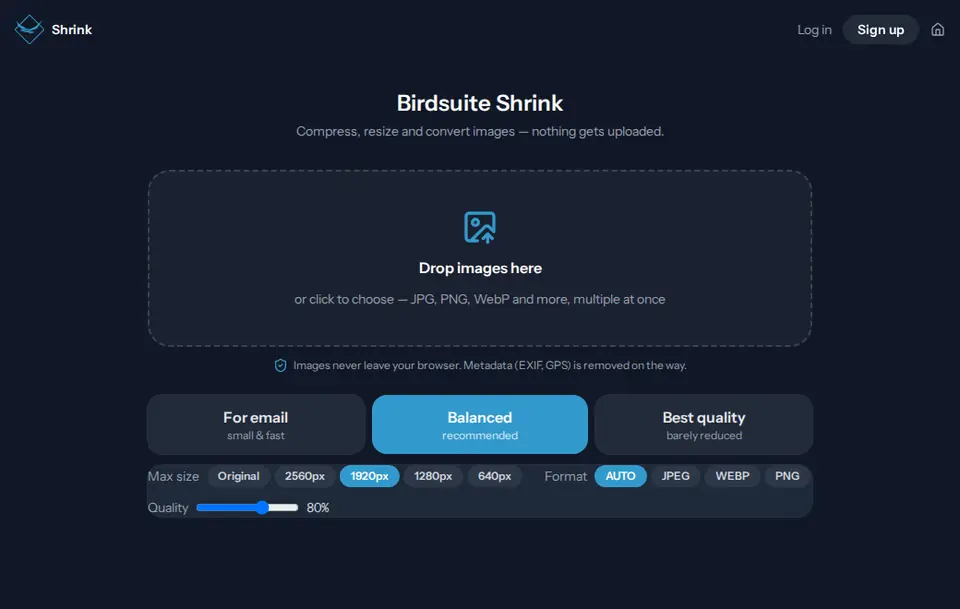
Shrink converts every image right in your browser. Pick "For email", "Balanced" or "Best quality", see straight away how much you save, and download the results one by one or as a ZIP.
Drag one or many images into the window or pick them — JPG, PNG, WebP and more.
Choose "For email", "Balanced" or "Best quality", or set size, format and quality yourself.
Download each image on its own or all of them as a ZIP. Too big for email? Carry on with Birdsuite Transfer.
Drop as many images as you like. Shrink processes them in parallel; only your device sets the limit.
Choose the output format yourself or use "Auto": PNG and WebP stay as they are, everything else becomes JPEG.
On conversion, EXIF data such as GPS position, camera and capture time is dropped. The photo keeps its correct orientation.
"For email" (1280 pixels, 70 %), "Balanced" (1920 pixels, 80 %) and "Best quality" (2560 pixels, 90 %).
Cap the longest edge at 2560, 1920, 1280 or 640 pixels or keep the original; set the quality from 50 to 95 %.
If an image doesn't get smaller in Auto mode, Shrink keeps the original instead of inflating it.
For every image and the whole batch you see the size before and after and the saving in percent.
One click downloads all finished images as a ZIP file.
Test it yourself: Test it yourself: open Shrink, switch off Wi-Fi and mobile data, and shrink a few images. Converting and downloading keep working, because nothing goes to a server.
Free – no subscription
As many images as you like, as JPEG, WebP or PNG
Shrink has no paid plan. There is no limit from our side; very large files only depend on your device.
| Criterion | Birdsuite Shrink | Typical online image compressors |
|---|---|---|
| Images are uploaded | No | Usually yes |
| Ads | None | Often |
| Many images at once | Yes, no limit on our side | Often capped, e.g. at 20 images |
| Resize and convert format | Yes, in the same step | Often separate tools |
| EXIF and GPS data | Removed on conversion | Varies |
| Target size in KB | Not yet | At some tools |
Last updated: 21 October 2026
Bring photos and scans down to a size that upload forms and mailboxes accept.
Convert product photos to WebP and cap them at 1920 pixels so pages load faster.
Email holiday pictures without your home's location travelling along.
Shrink the images, send them in one go and put the link on the flyer as a QR code.
Send large files without an account — free up to 5 GB, up to 1 TB per transfer with Max. Stored in Germany, with download notifications.
Record your screen and camera in the browser — no upload, no account, no time limit on our side. Save the file or share it via Transfer.
Trim, mute and shrink videos — right in your browser, no upload and no watermark.
Ready? Birdsuite Shrink runs right in your browser.
Last updated: 21 October 2026