Skip to content

Birdsuite Note

Markdown notes that start instantly

Markdown notes that start instantly: no account in the browser, synced on servers in the EU (Germany and France) with a free account — shareable and scriptable via API.

  • Start without account
  • Servers in the EU (Germany and France)
  • Free

Alternative to Notion, HackMD, StackEdit
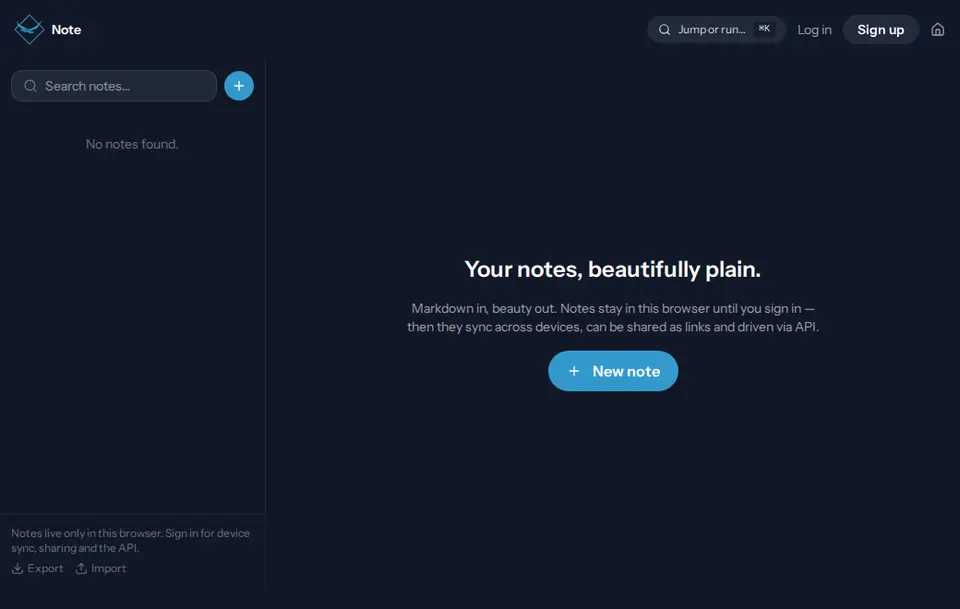
Start page of Birdsuite Note in the browser

Free

Free: what Birdsuite Note does without a subscription

Markdown notes, sync, sharing and API — all free

Included for free

  • No account, right in your browser
  • Sync on servers in the EU (Germany and France) with a free account
  • Share links and live co-editing
  • REST API with a personal token

Free, with no catch

  • Account optional Start without signing up. A free account only adds sync and sharing.
  • No ads No banners, no pop-ups, no sponsored results — in the free plan too.
  • No tracking No tracking cookies, no profiles. We only count visits, cookieless and with shortened IP addresses.
  • Servers in the EU (Germany and France) What needs a server runs on servers in the EU (Germany and France). Exceptions are listed openly under data and privacy.
  • No payment details No credit card and no trial: the free plan stays free for as long as you use it.

There is no paid plan: everything Birdsuite Note does is free, with no trial that runs out.

Open Note for free

Birdsuite Note is a browser-based Markdown editor by Berlin Bird Studios in Germany. Without an account, notes stay in your browser only. A free account syncs them through servers in the EU (Germany and France) and unlocks share links, real-time co-editing and a REST API. Note is completely free and shows no ads.

The problem

You just want to jot something down, and the notes app asks you to sign up first. Later the note needs to reach your phone, a colleague or a script — and that takes yet another tool.

The solution

With Note you start writing right away, no account needed; your notes stay in your browser. With a free account they live on servers in the EU (Germany and France), synced across your devices, shareable by link and scriptable through the REST API.

How it works

  1. 1

    Open and write

    Open Note and start typing, formatted or straight in Markdown. Saving is automatic.

  2. 2

    Organise

    Give notes categories, search them or jump to any note with Ctrl/Cmd+K.

  3. 3

    Sync and share

    Sign up for free: your notes are on all your devices, and you share them by link.

Features

Instant, no account

Notes live in your browser's storage and never reach our server. Export and import as a file are included.

Sync on servers in the EU (Germany and France)

With a free account your notes are the same on every device, stored in the EU (Germany and France).

REST API for scripts and AI agents

Read, create, update, delete and share notes with a personal token. Handy for automations and MCP servers.

Share by link

Anyone with the link can read the note. You can withdraw the share at any time.

Live co-editing

Anyone signed in who has the link writes along in real time. Changes show up for everyone instantly.

Formatted or Markdown

Switch between the formatted editor and the Markdown source. With checklists, tables and a table of contents.

Command palette

Ctrl/Cmd+K jumps to any note or runs a command. Categories and search keep things tidy.

Data and privacy

Processing
Without an account, only in your browser. With an account, on our servers in the EU (Germany and France) (Host Europe, Strasbourg, France).
Storage
Without an account, notes live in your browser's localStorage; clearing your browser data removes them. With an account we store title, content and category until you delete the note or your account.
Processors
Host Europe (Strasbourg, France) as our hosting provider. No other services.

How we process data, tool by tool Privacy policy (German)

Pricing

Free – no subscription

Markdown notes, sync, sharing and API — all free

  • No account, right in your browser
  • Sync on servers in the EU (Germany and France) with a free account
  • Share links and live co-editing
  • REST API with a personal token

All plans at a glance

What Note can’t do

  • No end-to-end encryption for synced notes.
  • No native apps: Note runs in the browser and can be installed as a web app.
  • About 1 MB of text per note.
  • Co-editing needs an account; without one, a shared note is read-only.
  • Without an account there is no sync between devices, and space depends on your browser storage.

Birdsuite Note compared

Criterion Birdsuite Note Typical alternatives
Start without an account Yes, in the browser Usually an account is needed
Storage with an account Servers in the EU (Germany and France) Often USA
REST API Free, with a personal token Sometimes limited or paid only
End-to-end encryption No With some providers
Price Free, no subscription Free plan plus subscriptions
Native apps No, web app Usually yes

Last updated: 21 October 2026

Who is it for?

Quick notes

Shopping list, idea, phone number: open Note and type, no sign-up.

Teams and projects

Share minutes and how-tos by link and edit them together live.

Developers and AI agents

Read and write notes through the REST API from scripts, automations or MCP servers.

  1. Book
  2. Meet
  3. Note

Client meeting

Guests book a slot, optionally with its own video room; you keep your notes from the call in Note.

from €10/month

Birdsuite Meet

Video calls for 4–8 people in the browser: send a link and you're in — no account, no app, audio and video go directly between you.

No account

Alternative to Zoom, Google Meet, Jitsi, Whereby

More about Meet Open Meet

from €3/month

Birdsuite Book

Your booking page: guests pick a time, both get a calendar invite — with its own video room if you like. Plus free group polls, without ads.

Guests need no account

Alternative to Calendly, Doodle

More about Book Open Book

Free

Birdsuite Seal

Share passwords and secrets with a one-time link: encrypted in your browser, the key never reaches our server — deleted after the first open.

No account

Alternative to Privnote, Onetime Secret, Password Pusher

More about Seal Open Seal

Category: Communicate & organize

Frequently asked questions

Do I need an account?
No. Without an account your notes stay in your browser, and you can export them as a file. You only need a free account for sync, sharing and the API.
Where are my notes stored?
Without an account only in your browser; they never reach our server. With an account on our servers in the EU (Germany and France) (Host Europe, Strasbourg, France).
Can I share and co-edit notes?
Yes, with a free account. Anyone with the link can read the note; people who are signed in can edit it live. You can withdraw the share at any time.
Is there an API for my AI tools?
Yes, a REST API at /api/notes with a personal token. Scripts, automations or MCP servers can list, create, update, delete and share your notes with it. The token is shown only once; creating a new one invalidates the old one.
Are notes end-to-end encrypted?
No. Synced notes are encrypted in transit and stored on servers in the EU (Germany and France). For passwords and other secrets, Birdsuite Seal is the better choice.
What if I clear my browser storage?
Then notes kept without an account are gone. Export them as a file regularly, or write with a free account so your notes are kept on the server.
What does Note cost?
Nothing. Note has no paid plan and shows no ads.

Ready? Birdsuite Note runs right in your browser.

Last updated: 21 October 2026

Open Note – free